Everything PootlrHost does, in one place.
Every feature comes with every plan, from the day you sign up. The ones marked Optional can be switched off, so your dashboard only shows what you use.
Your website
A proper campsite website with booking on every page, made from what you fill in once. No designer, no developer.
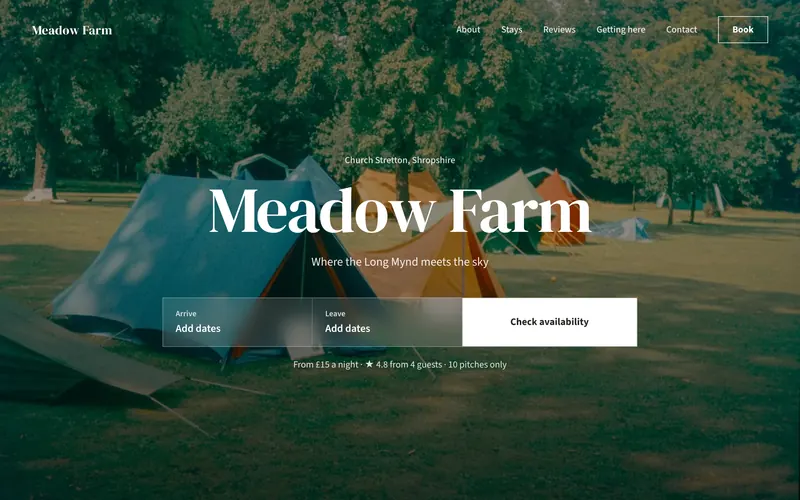
- Three layouts
- Classic, Structured or Editorial. Change layout whenever you like without losing anything.
- Four moods, or your own colour
- Meadow, Coast, Woodland and Heritage set the colours and fonts. Or pick your own accent colour.
- Each pitch type, properly
- Its own photos, what’s included and how many it sleeps, with the price for the dates a guest picks.
- Photos and video
- A big photo or a looping video at the top, and a gallery that opens full screen. Every photo is resized for fast loading on phones.
- Getting here
- Directions, what3words and a map, with a link to open the route in Google Maps or Apple Maps.
- Nearby and common questions
- Places worth knowing from your guest guide, and answers to what guests always ask: dogs, arrival times, fires, signal.
- Guest reviews Optional
- Ask guests for a review after they leave and choose which go on your website.
- What’s on Optional
- Your events on the website, with tickets guests can add when they book.
- Contact form Optional
- A “Send us a message” form. What guests send arrives in Messages.
- Your own address
- A free pootlrhost.co.uk address straight away, or a domain you already own, with SSL either way.
- Found in search
- Page titles and descriptions, a sitemap, link previews and the details search engines read, all done for you.
- Booking terms and privacy pages
- Written from your settings, and linked from every page.
- Analytics, with consent
- Add Google Analytics, Google Tag Manager or a Meta pixel. Guests see a cookie banner and nothing loads until they accept.
Online booking
Guests see live availability and book in a few taps, on your website, your booking page or a widget on a site you already have.
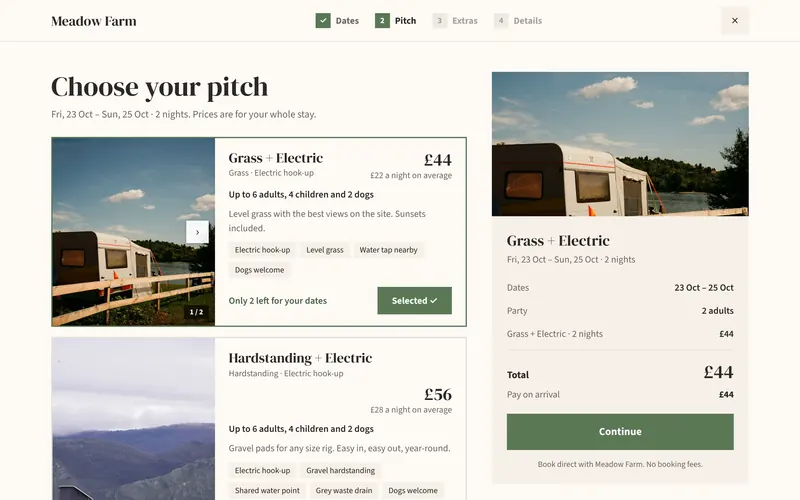
- Card bookings confirmed instantly
- Guests who pay by card are booked in straight away. Pay-on-arrival bookings come to you as requests to accept.
- Pitch types and pitches
- As many as you like: grass, hardstanding, tents, hook-ups, bell tents and huts, each with its own numbered pitches.
- Prices that fit your season
- Seasons, weekend and event prices, and a price for any single date. Prices change with the dates a guest picks.
- Your booking rules
- Minimum and maximum stays, arrival days, arrival and leaving times, and how far ahead guests can book.
- Extras
- Dogs, awnings, extra cars: anything you charge for by the night, for every pitch type or just some.
- Offers and promo codes Optional
- Discounts that apply themselves, and codes guests enter when they book.
- Pick your pitch Optional
- Draw your field once and guests choose their pitch on the map.
- Smart pricing Optional
- Prices that rise a little when you’re nearly full and drop on quiet dates, automatically or as suggestions you approve.
- Cancellation policies
- Set yours once. Guests see it, with your deposit and balance terms, before they book.
- Booking widgets
- A floating Book button, an availability checker, a date bar or a full booking page for your own website, plus a booking link and QR code.
- Phone and walk-up bookings
- Add them yourself in seconds, in the same calendar, with no booking fee.
- Changes without the maths
- Move or change a booking and the price is worked out again. Cancel or decline with a refund in a couple of taps.
Payments
Card payments go through Stripe into your own bank account. PootlrHost never holds your money.
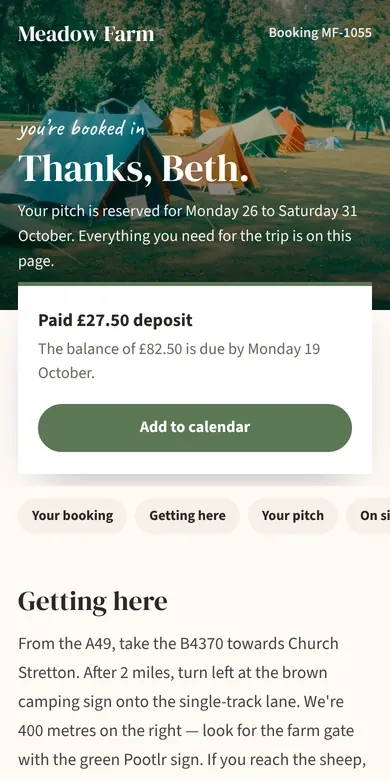
- Deposits and balances
- Take a deposit when guests book, and the balance from their saved card before they arrive.
- Or pay on arrival
- Keep taking payment on the day if that suits you better.
- Payment links
- Send any guest a link to pay what they owe.
- Refunds
- Refund all or part of a payment from the booking.
- Payments and payouts
- See what’s been paid, what’s due and what Stripe has paid into your bank.
- One price, however guests pay
- No card surcharges. On Pay As You Go you can pass the £1 on as a service fee, shown upfront and in every total.
Your guests
Everything a guest needs from the day they book to the day they leave, so fewer of them need to ring you.
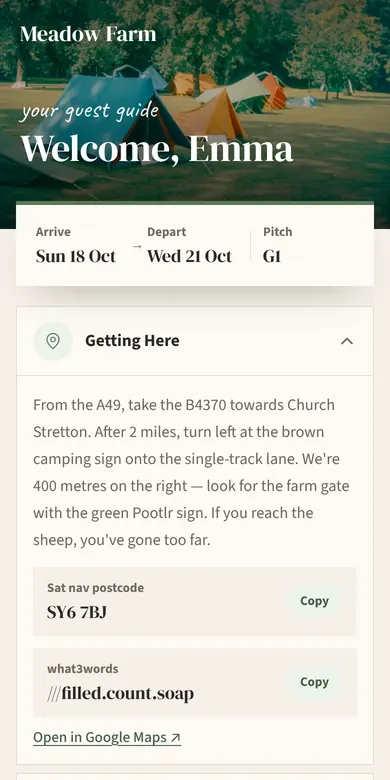
- A guest guide for every booking Optional
- Directions, what3words, the Wi-Fi by QR code, your house rules, the local area and who to call in an emergency.
- Works with no signal Optional
- Once a guest has opened their guide, it’s saved on their phone and still opens down a lane with no signal.
- The gate code, at the right time Optional
- Shown from the day before arrival, and only once the stay is confirmed.
- Their pitch on the map Optional
- The site map in their guide, with their pitch marked.
- A stay page
- Their booking, what they’ve paid and what’s still to pay. They can pay the balance, message you or ask to cancel.
- Your stays and Book again
- Guests sign in with their email to see their stays, and book next year with their details filled in.
- Automatic emails
- A confirmation, a reminder before they arrive, a welcome and a thank you after. Preview each one and send yourself a test.
- Text messages Optional
- Booking confirmations and reminders by text as well as email.
- Loyalty rewards Optional
- A reward, like money off, for guests who keep coming back.
Running the site
Built to be used on a phone, in a field. See the day at a glance and get on with it.
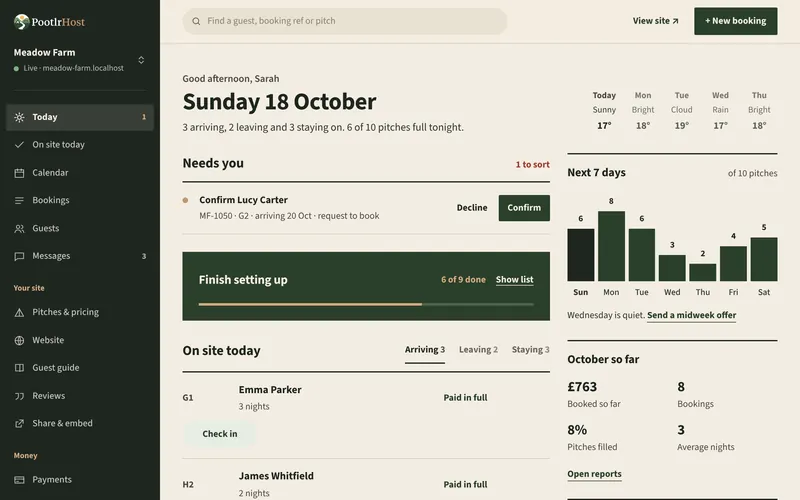
- Today
- Who’s arriving and leaving, requests to accept, balances due, clashes with other booking sites and the weather.
- On site today
- Who’s due, which pitch they’re on and what they still owe. Check guests in as they arrive.
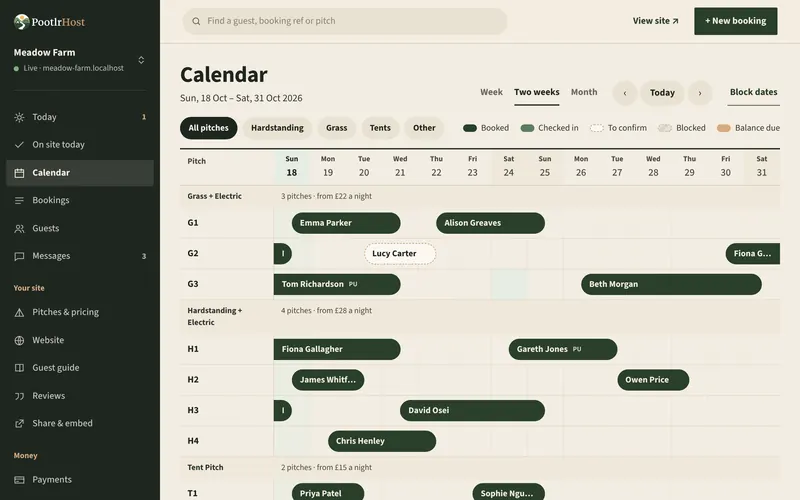
- Calendar
- Every pitch across a week, two weeks or a month, wherever each booking came from.
- Bookings and guests
- Every booking and every guest, with each guest’s past stays.
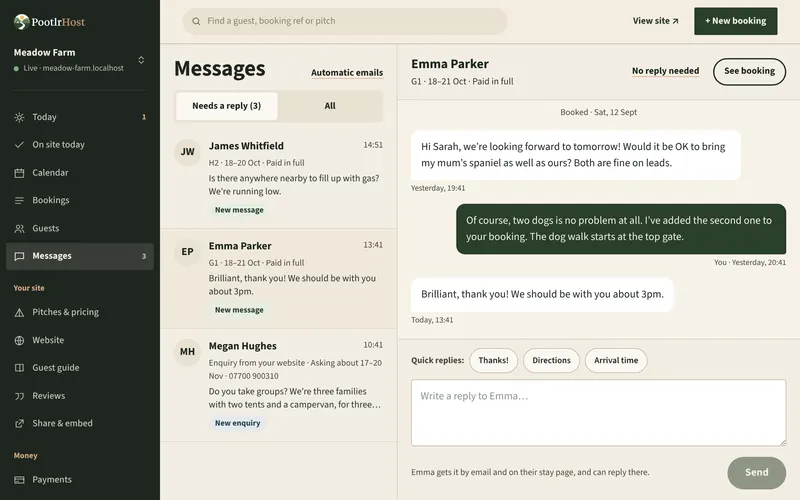
- Messages
- One inbox for guest messages and website enquiries. Reply from your phone and guests see it on their stay page and by email.
- Reports
- Bookings, occupancy and takings by month and season, with CSV exports of your bookings and reports.
- Insights Optional
- The weather and the bank and school holidays ahead, questions about your bookings answered in plain English, and a weekly email.
- Activity log
- Who changed what, and when.
Other booking sites
Keep the listings that bring you guests. Their bookings come into your calendar, and your availability goes out to them.
- Pitchup Optional
- Connect with your Pitchup API key. Its bookings come in every 15 minutes, and your availability on Pitchup is updated straight away.
- Two-way calendar sync Optional
- Hipcamp (including Cool Camping), Airbnb, Booking.com, Campsites.co.uk, Glampsites, Canopy & Stars and any site with an iCal (.ics) link, pitch by pitch.
- How often Optional
- PootlrHost reads their calendars every 15 minutes, or when you press Sync now. They read PootlrHost’s on their own schedule, often every few hours.
- Clashes flagged Optional
- Calendar sync isn’t instant, so two sites can now and then sell the same night. If that happens, PootlrHost keeps both bookings, flags the clash on Today and emails you.
- Prices stay where they are
- Only availability is synced. You set your prices on each booking site.
Your team and your account
Bring in help without handing over your password, and bring your old bookings with you.
- Logins for your team
- Invite as many people as you need, each as a Manager, Staff or Viewer, so everyone sees what they need and no more.
- Two-step sign-in
- A code from an authenticator app as well as your password.
- More than one campsite
- Run several sites from one login and switch between them.
- Import your bookings
- Bring bookings and guests across from a CSV: our template, or your old system’s export. You check every row before anything goes in.
- Set up before you go live
- Build your site as a draft, preview it, and go live when it’s ready. A getting-started list on Today shows what’s left.
Switch off what you don’t need.
A five-pitch CL doesn’t need event tickets. Choose these when you set up, and change your mind any time in Settings. Switching one off hides it and deletes nothing.
List what’s on at your site, and let guests add tickets when they book.
Discounts that apply automatically, and codes guests enter when they book.
Give returning guests a reward, like money off, once they’ve stayed with you a few times.
Ask guests for a review after they leave and choose which go on your website, while reviews you add yourself in the website editor always stay.
Draw your pitches on a map for the guest guide, and let guests pick a pitch when they book.
A page for every booking with directions, the Wi-Fi, the gate code and anything else guests need.
Prices that rise a little when you’re nearly full and drop on quiet dates, either automatically or as suggestions you approve.
Keep Pitchup, Hipcamp, Airbnb and other booking sites in step with your calendar, with any clashes flagged on Today.
Reports on your bookings and takings, with tips on busy dates and the weather ahead.
A “Send us a message” form on your website. You’ll find what guests send in Messages.
Send guests texts as well as emails, like a booking confirmation or a reminder before they arrive. Texts may cost extra.

All of it, on every plan.
Set up in about ten minutes, and see your site before it goes live. £1 a booking or £24.99 a month.
Start free